
Contents
Outline
Lighthouse is an open-source web page quality measurement tool provided by Google. You can run it directly from the DevTools in the Chrome browser, and it can measure web page quality across four categories: Performance, Accessibility, Best Practices, and SEO.
Here are the Lighthouse scores of this blog before optimization. With Performance at 54 and Accessibility at 96, there was significant room for improvement.
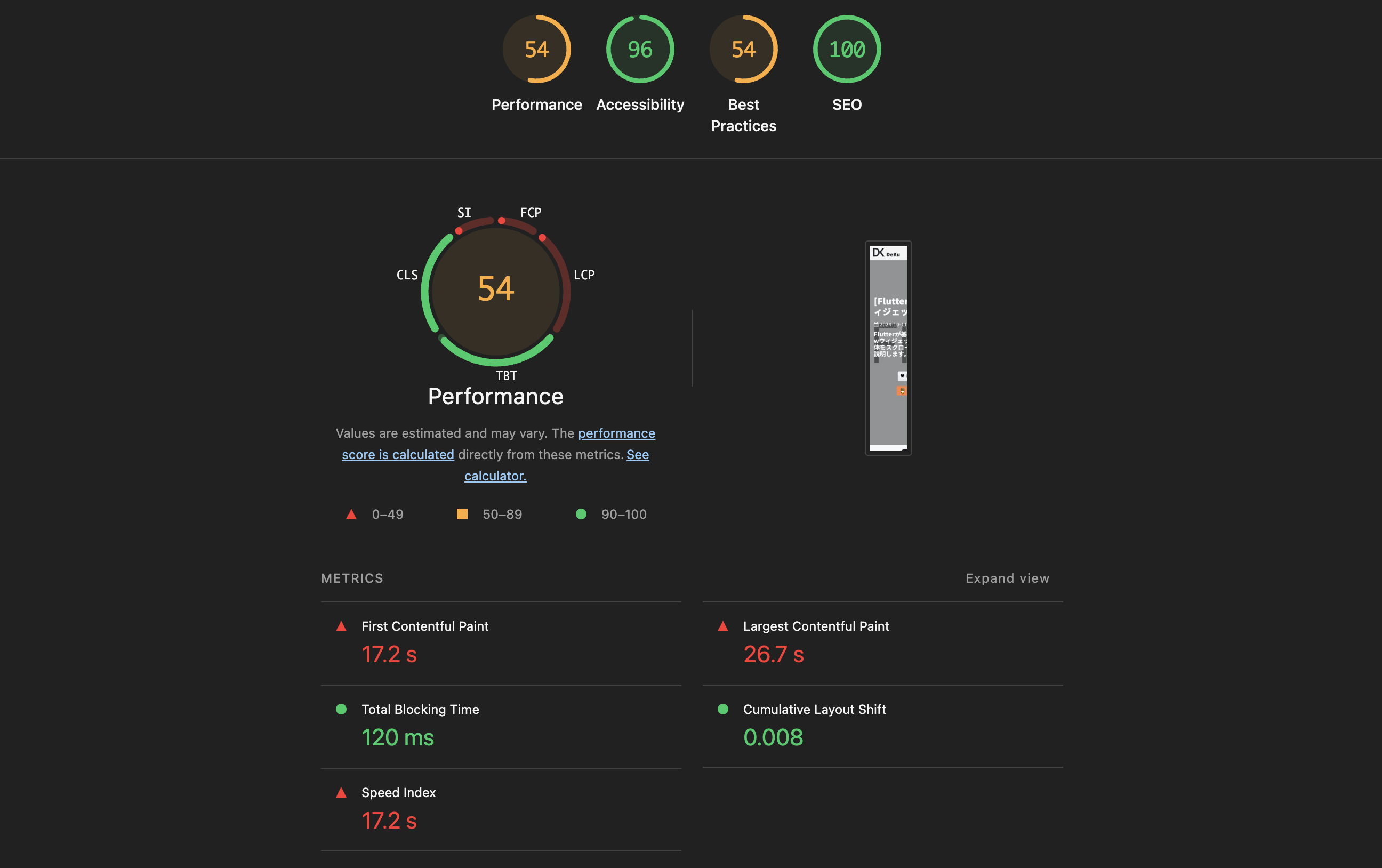
In this blog post, I will share the optimization work applied to improve the overall Lighthouse scores of a blog built with Astro. This covers various areas including image optimization, CSS optimization, web font optimization, resource hints, and accessibility improvements, so I hope it helps those who are planning similar optimizations.
Here are the scores after applying the optimizations. Performance improved to 93 and Accessibility reached 100.
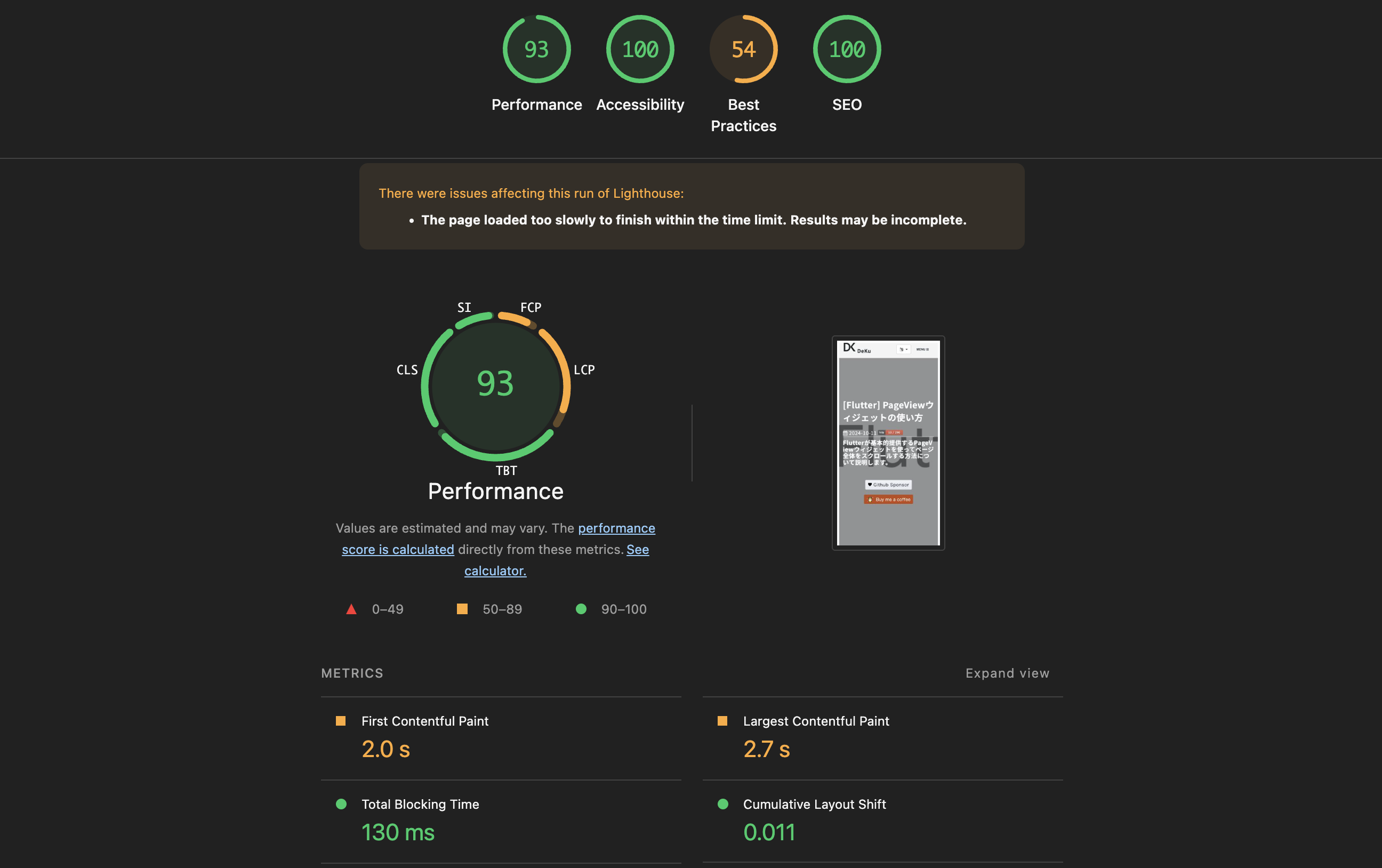
Image Optimization
Problem
When inserting images using the  syntax in markdown, only a simple <img> tag is generated. This causes the following issues:
- You need to manually write
<picture>tags every time to serve next-gen formats likeAVIF/WebP. - Missing
width/heightattributes causeCLS (Cumulative Layout Shift). - Optimization attributes like
loading="lazy"anddecoding="async"must be added manually each time.
Solution
To solve this problem, you can create a custom plugin. Here, I created a rehype plugin (rehype-picture). This plugin automatically converts image tags in markdown into <picture> tags, and performs the following tasks automatically:
- Automatically generates
AVIF/WebPformat images using theSharplibrary - Reads the original image’s
widthandheightand inserts them automatically → preventsCLS - Automatically adds
loading="lazy"anddecoding="async"attributes
To create the rehype plugin, create a src/plugins/rehype-picture.mjs file and add the following code:
/**
* Rehype plugin to auto-convert <img> elements and raw <img> HTML strings
* into <picture> elements with AVIF/WebP sources.
*
* Handles both HAST element nodes (from markdown ) and
* raw string nodes (hand-written <img> tags that haven't been parsed by rehypeRaw yet).
*/
import { existsSync } from 'node:fs';
import { join, extname, dirname, basename } from 'node:path';
import sharp from 'sharp';
// Module-level caches — persist across all files in a single build
const dimensionCache = new Map();
const generationCache = new Set();
async function getDimensions(filePath) {
if (dimensionCache.has(filePath)) return dimensionCache.get(filePath);
try {
const meta = await sharp(filePath).metadata();
const dims = { width: meta.width, height: meta.height };
dimensionCache.set(filePath, dims);
return dims;
} catch {
return null;
}
}
async function ensureVariant(srcPath, destPath, format, isAnimated) {
const key = destPath;
if (generationCache.has(key)) return;
generationCache.add(key);
if (existsSync(destPath)) return;
try {
let pipeline = sharp(srcPath, { animated: isAnimated });
if (format === 'avif') {
pipeline = pipeline.avif({ quality: 50 });
} else if (format === 'webp') {
pipeline = pipeline.webp({ quality: 80 });
}
await pipeline.toFile(destPath);
} catch {
// Silently skip if conversion fails (e.g. corrupt image)
}
}
function variantPath(filePath, newExt) {
const dir = dirname(filePath);
const base = basename(filePath, extname(filePath));
return join(dir, `${base}.${newExt}`);
}
function variantSrc(src, newExt) {
const dot = src.lastIndexOf('.');
return `${src.substring(0, dot)}.${newExt}`;
}
function shouldSkip(src) {
if (!src) return true;
if (src.startsWith('http://') || src.startsWith('https://')) return true;
if (src.startsWith('data:')) return true;
if (src.toLowerCase().endsWith('.svg')) return true;
return false;
}
/**
* Determine which variants to generate based on original extension.
* Returns array of { ext, format, mime, animated }
*/
function getVariants(ext) {
const lower = ext.toLowerCase();
switch (lower) {
case '.jpg':
case '.jpeg':
case '.png':
return [
{ ext: 'avif', format: 'avif', mime: 'image/avif', animated: false },
{ ext: 'webp', format: 'webp', mime: 'image/webp', animated: false },
];
case '.gif':
return [
{ ext: 'webp', format: 'webp', mime: 'image/webp', animated: true },
];
case '.avif':
return [
{ ext: 'webp', format: 'webp', mime: 'image/webp', animated: false },
];
case '.webp':
return [
{ ext: 'avif', format: 'avif', mime: 'image/avif', animated: false },
];
default:
return [];
}
}
async function processImage(src, publicDir) {
if (shouldSkip(src)) return null;
const ext = extname(src);
const variants = getVariants(ext);
if (variants.length === 0) return null;
const filePath = join(publicDir, src);
if (!existsSync(filePath)) return null;
const dims = await getDimensions(filePath);
// Generate missing variants
await Promise.all(
variants.map((v) => {
const dest = variantPath(filePath, v.ext);
return ensureVariant(filePath, dest, v.format, v.animated);
})
);
return {
variants: variants.map((v) => ({
srcset: variantSrc(src, v.ext),
type: v.mime,
})),
width: dims?.width,
height: dims?.height,
};
}
function createPictureNode(imgNode, result) {
const sources = result.variants.map((v) => ({
type: 'element',
tagName: 'source',
properties: { srcSet: v.srcset, type: v.type },
children: [],
}));
// Enhance the img node with dimensions and loading attrs
const imgProps = { ...imgNode.properties };
if (result.width) imgProps.width = result.width;
if (result.height) imgProps.height = result.height;
if (!imgProps.loading) imgProps.loading = 'lazy';
if (!imgProps.decoding) imgProps.decoding = 'async';
const enhancedImg = { ...imgNode, properties: imgProps };
return {
type: 'element',
tagName: 'picture',
properties: {},
children: [...sources, enhancedImg],
};
}
function createPictureHtml(src, alt, result) {
const sourceHtml = result.variants
.map((v) => `<source srcset="${v.srcset}" type="${v.type}" />`)
.join('\n ');
const widthAttr = result.width ? ` width="${result.width}"` : '';
const heightAttr = result.height ? ` height="${result.height}"` : '';
const altAttr = alt ? ` alt="${alt}"` : '';
return `<picture>
${sourceHtml}
<img src="${src}"${altAttr}${widthAttr}${heightAttr} loading="lazy" decoding="async">
</picture>`;
}
// Regex to match <img ... > tags in raw HTML strings
const IMG_TAG_RE = /<img\s+([^>]*?)\/?\s*>/gi;
const SRC_ATTR_RE = /src=["']([^"']+)["']/i;
const ALT_ATTR_RE = /alt=["']([^"']*?)["']/i;
function isInsidePicture(raw) {
return /<picture[\s>]/i.test(raw);
}
function walkTree(node, parent, promises, publicDir) {
if (!node) return;
// Case 1: HAST element node — <img> from markdown
if (node.type === 'element' && node.tagName === 'img') {
// Skip if already inside a <picture>
if (parent?.type === 'element' && parent.tagName === 'picture') return;
const src = node.properties?.src;
if (shouldSkip(src)) return;
const idx = parent?.children?.indexOf(node);
if (idx == null || idx < 0) return;
promises.push(
processImage(src, publicDir).then((result) => {
if (!result) return;
parent.children[idx] = createPictureNode(node, result);
})
);
return;
}
// Case 2: raw string node containing <img> tags
if (node.type === 'raw' && typeof node.value === 'string') {
if (!IMG_TAG_RE.test(node.value)) return;
IMG_TAG_RE.lastIndex = 0; // reset after test
// Skip if the raw chunk is inside a <picture>
if (isInsidePicture(node.value)) return;
const idx = parent?.children?.indexOf(node);
if (idx == null || idx < 0) return;
// Collect all <img> tags in this raw node
const imgMatches = [...node.value.matchAll(IMG_TAG_RE)];
if (imgMatches.length === 0) return;
promises.push(
(async () => {
let newValue = node.value;
for (const match of imgMatches) {
const fullTag = match[0];
const srcMatch = fullTag.match(SRC_ATTR_RE);
if (!srcMatch) continue;
const src = srcMatch[1];
const altMatch = fullTag.match(ALT_ATTR_RE);
const alt = altMatch ? altMatch[1] : '';
const result = await processImage(src, publicDir);
if (!result) continue;
const pictureHtml = createPictureHtml(src, alt, result);
newValue = newValue.replace(fullTag, pictureHtml);
}
node.value = newValue;
})()
);
return;
}
// Recurse into children
if (node.children) {
for (const child of node.children) {
walkTree(child, node, promises, publicDir);
}
}
}
export default function rehypePicture(options = {}) {
const publicDir = options.publicDir || 'public';
return async (tree) => {
const promises = [];
walkTree(tree, null, promises, publicDir);
await Promise.all(promises);
};
}Then open astro.config.mjs and configure the plugin as follows:
// astro.config.mjs
import rehypePicture from './src/plugins/rehype-picture.mjs';

export default defineConfig({
  markdown: {
    rehypePlugins: [
      [
        rehypePicture,
        { publicDir: new URL('./public', import.meta.url).pathname },
      ],
    ],
  },
});
Result
By writing just one line of image markdown like this:
An optimized <picture> tag is automatically generated as follows:
<picture>
  <source srcset="/assets/images/example.avif" type="image/avif" />
  <source srcset="/assets/images/example.webp" type="image/webp" />
  <img
    src="/assets/images/example.png"
    alt="Example image"
    width="1200"
    height="630"
    loading="lazy"
    decoding="async"
  />
</picture>
CSS Optimization
Bootstrap Lightweight Replacement
This blog uses Bootstrap. To make the CSS lighter, I replaced the full bootstrap.min.css (about 190KB) with bootstrap-grid.min.css (about 40KB) which only includes the grid system. Utility classes that were actually being used (.d-flex, .d-none, .text-center, etc.) were defined directly in global.scss.
// global.scss — Bootstrap utility replacements
.d-flex {
  display: flex !important;
}
.d-none {
  display: none !important;
}
.d-block {
  display: block !important;
}
.justify-content-between {
  justify-content: space-between !important;
}
.justify-content-center {
  justify-content: center !important;
}
.w-100 {
  width: 100% !important;
}
.mx-auto {
  margin-left: auto !important;
  margin-right: auto !important;
}
.text-center {
  text-align: center !important;
}
Astro Inline Stylesheets
By applying inlineStylesheets: 'always' in Astro’s build configuration, CSS is inlined directly into <style> tags without external CSS file requests. This reduces network requests for CSS files, decreasing render blocking.
// astro.config.mjs
export default defineConfig({
  build: {
    inlineStylesheets: 'always',
  },
});
Async CSS Loading
Stylesheets that are not essential for initial rendering, such as Font Awesome’s CSS, can be loaded asynchronously to improve performance. By using the media="print" attribute and onload event, I modified it to load CSS without blocking rendering.
<!-- Font Awesome CSS (async) -->
<link
  rel="preload"
  as="style"
  href="/assets/vendor/font-awesome/css/font-awesome.min.css"
/>
<link
  rel="stylesheet"
  href="/assets/vendor/font-awesome/css/font-awesome.min.css"
  media="print"
  onload="this.media='all'"
/>
<noscript>
  <link
    rel="stylesheet"
    href="/assets/vendor/font-awesome/css/font-awesome.min.css"
  />
</noscript>
With this modification, the media="print" setting excludes it from initial rendering, and once loaded, changing it to this.media='all' applies the CSS.
Here, the <noscript> tag is a fallback for environments where JavaScript is disabled.
Web Font Optimization
Reducing Font Weights
When loading fonts, including unused weights means downloading unnecessary font files. Initially, all 6 weights (100, 300, 400, 500, 700, 900) were loaded, but I reduced them to only the 2 that were actually used (400, 700).
// Before
Noto+Sans+KR:wght@100;300;400;500;700;900

// After
Noto+Sans+KR:wght@400;700
Async Loading
The same async loading pattern used for CSS is applied to web fonts. Use preload to fetch in advance, and the media="print" + onload pattern to prevent render blocking.
<!-- Google Fonts (async) -->
<link rel="preconnect" href="https://fonts.googleapis.com" />
<link rel="preconnect" href="https://fonts.gstatic.com" crossorigin />
<link
  rel="preload"
  as="style"
  href="https://fonts.googleapis.com/css2?family=Noto+Sans+KR:wght@400;700&display=swap"
/>
<link
  href="https://fonts.googleapis.com/css2?family=Noto+Sans+KR:wght@400;700&display=swap"
  rel="stylesheet"
  media="print"
  onload="this.media='all'"
/>
<noscript>
  <link
    rel="stylesheet"
    href="https://fonts.googleapis.com/css2?family=Noto+Sans+KR:wght@400;700&display=swap"
  />
</noscript>
Preconnect
Google Fonts uses two domains: fonts.googleapis.com and fonts.gstatic.com. Setting up preconnect performs DNS lookup, TCP connection, and TLS handshake in advance.
<link rel="preconnect" href="https://fonts.googleapis.com" />
<link rel="preconnect" href="https://fonts.gstatic.com" crossorigin />
Also, the crossorigin attribute is added to fonts.gstatic.com. This is because font files are fetched via CORS requests, so the preconnect also needs to establish a CORS connection in advance.
Resource Hints Optimization
Adding Preconnect
Added preconnect for external service domains to reduce initial connection time.
<link rel="preconnect" href="https://www.googletagmanager.com" />
<link rel="preconnect" href="https://pagead2.googlesyndication.com" />
<link rel="preconnect" href="https://utteranc.es" />
LCP Image Preload
I modified the hero image, a key LCP (Largest Contentful Paint) concern, to be preloaded with <link rel="preload">. Also, by setting fetchpriority="high" together, the browser fetches the resource with highest priority.
<link
  rel="preload"
  as="image"
  href="/assets/images/category/web/background.jpg"
  fetchpriority="high"
/>
Removing Unnecessary Preloads
I had added preload for Google Analytics and Google AdSense scripts, but since those <script> tags already have the async attribute, the browser was already automatically fetching the resources.
When the async attribute is present like this, preload is unnecessary and actually causes browser warnings, so it was removed.
Accessibility Improvements
Code Block Comment Color Contrast
The comment color in code blocks had insufficient contrast with the background, failing to meet the WCAG AA standard (4.5:1 ratio). So I changed the comment color from #545454 to #888888 to meet the accessibility standard.
Footer Text Color Contrast
The text-muted color in the footer also had insufficient contrast. So I changed the color to #adb5bd to improve readability.
Button Color Contrast
The sponsorship button color displayed at the bottom of the blog, #ff813f, also had insufficient contrast ratio with white text. So I changed it to #e56b2c to meet the WCAG AA standard.
Specifying Image Dimensions
Added width and height attributes to images not included in markdown (hit counters, affiliate banners, etc.) to prevent CLS. This makes the browser reserve space before loading images, preventing layout shifts from occurring.
Completed
Here is a summary of the optimization items applied:
| Area | Applied Changes |
|---|---|
| Images | Created a custom rehype-picture plugin for auto-conversion to <picture> tags, auto AVIF/WebP generation |
| CSS | Bootstrap lightweight replacement, inline stylesheets, async loading |
| Web Fonts | Weight reduction (6→2), async loading, Preconnect |
| Resource Hints | Preconnect added, LCP image preload, unnecessary preload removed |
| Accessibility | Color contrast improvements, image dimension specification |
Done! We’ve summarized the optimization work applied to improve the Lighthouse scores of an Astro blog. I recommend applying each item one by one while checking the score changes. Please also refer to the following related posts.
- [Web] Optimize Images Using avif and webp Formats
- [Web] Optimize loading Google Web Font
- [Code Quality] Lighthouse CI
Was my blog helpful? Please leave a comment at the bottom. it will be a great help to me!
App promotion
Deku.Deku created the applications with Flutter.If you have interested, please try to download them for free.



