概要
LighthouseはGoogleが提供するオープンソースのウェブページ品質測定ツールです。ChromeブラウザのDevToolsから直接実行でき、Performance、Accessibility、Best Practices、SEOの4つのカテゴリでウェブページの品質を測定することができます。
以下はこのブログの最適化前のLighthouseスコアです。Performanceが54点、Accessibilityが96点で、改善の余地が多い状態でした。
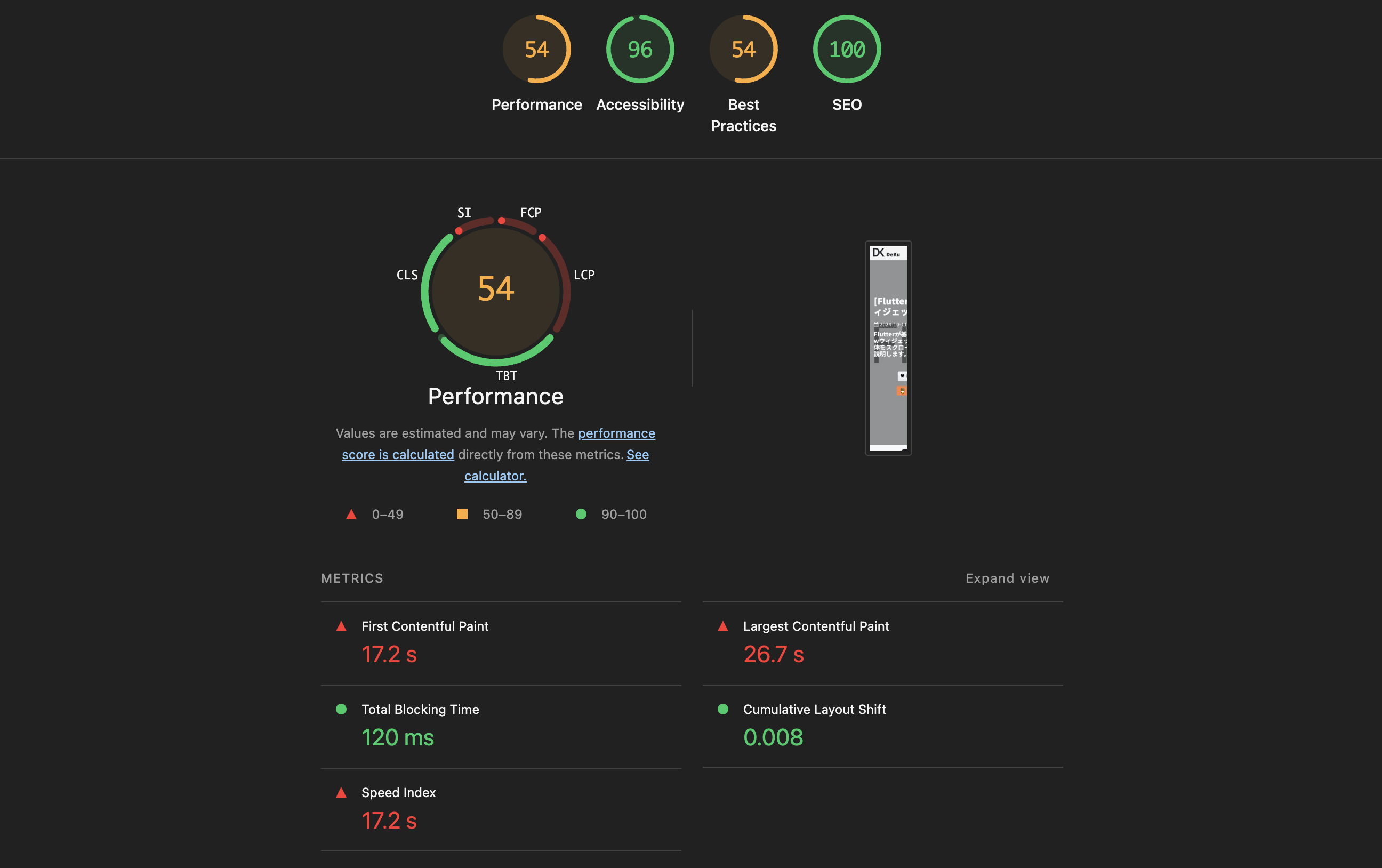
今回のブログポストでは、Astroで作ったブログのLighthouseスコアを全般的に改善するために適用した最適化作業を共有します。画像最適化、CSS最適化、ウェブフォント最適化、リソースヒント、アクセシビリティ改善など様々な領域をカバーしていますので、同様な最適化を計画されている方に参考になれば幸いです。
最適化を適用した後のスコアです。Performanceが93点、Accessibilityが100点に大幅に改善されました。
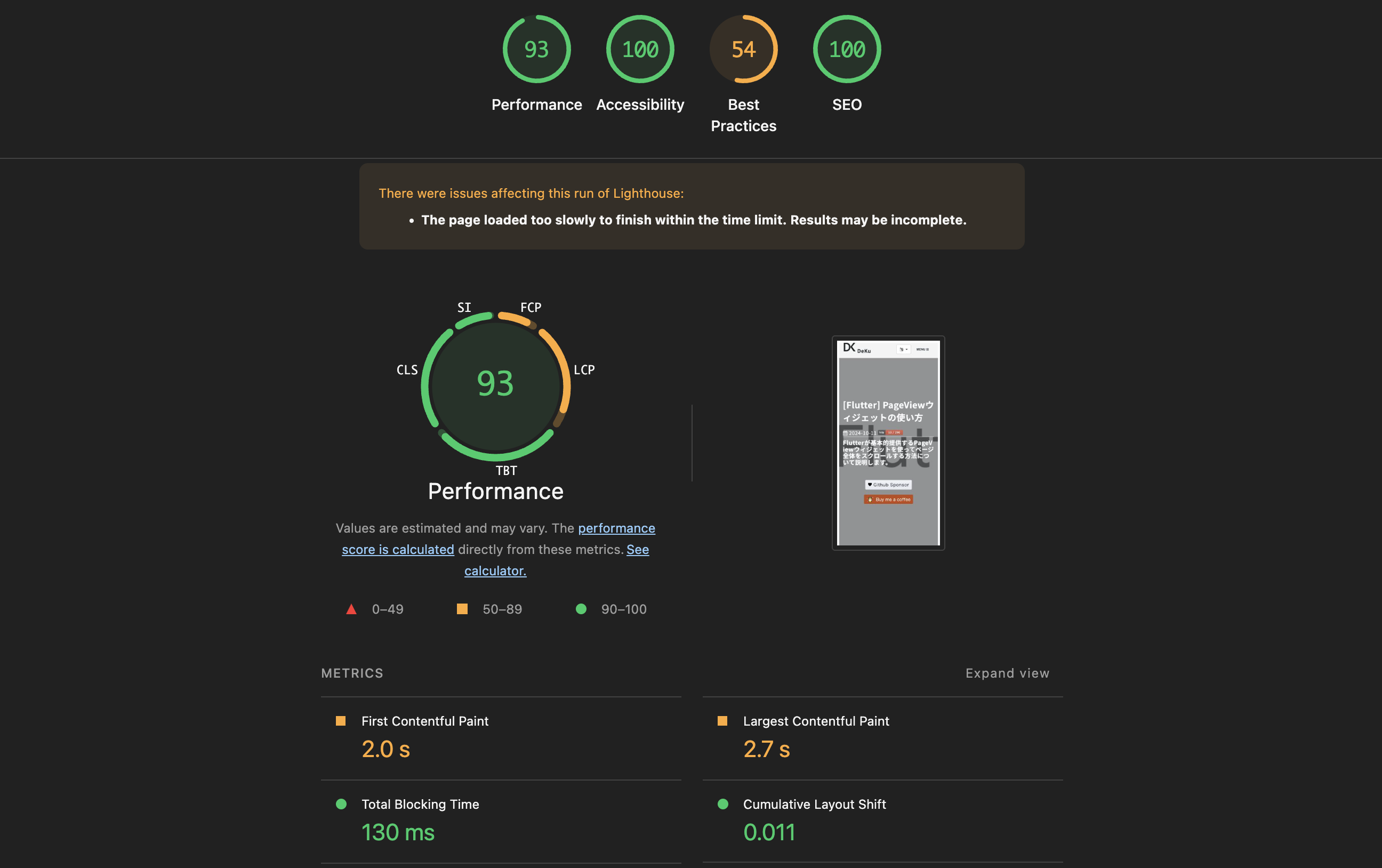
画像最適化
問題
マークダウンで構文を使って画像を挿入すると、単純な<img>タグだけが生成されます。この場合、次のような問題が発生します。
AVIF/WebPのような次世代フォーマットを提供するには毎回<picture>タグを手動で書く必要があります。width/height属性が欠けるとCLS(Cumulative Layout Shift)が発生します。loading="lazy"やdecoding="async"のような最適化属性も毎回手動で追加する必要があります。
解決
この問題を解決するためにカスタムプラグインを作成して使うことができます。ここではrehypeプラグイン(rehype-picture)を作成しました。このプラグインはマークダウンの画像タグを自動的に<picture>タグに変換し、次のような作業を自動で行います。
Sharpライブラリを使用してAVIF/WebPフォーマットの画像を自動生成- 元画像の
width、heightを読み取り自動挿入 →CLSを防止 loading="lazy"、decoding="async"属性を自動追加
rehypeプラグインを作成するためにsrc/plugins/rehype-picture.mjsファイルを作成し、次のように記述します。
/**
* Rehype plugin to auto-convert <img> elements and raw <img> HTML strings
* into <picture> elements with AVIF/WebP sources.
*
* Handles both HAST element nodes (from markdown ) and
* raw string nodes (hand-written <img> tags that haven't been parsed by rehypeRaw yet).
*/
import { existsSync } from 'node:fs';
import { join, extname, dirname, basename } from 'node:path';
import sharp from 'sharp';
// Module-level caches — persist across all files in a single build
const dimensionCache = new Map();
const generationCache = new Set();
async function getDimensions(filePath) {
if (dimensionCache.has(filePath)) return dimensionCache.get(filePath);
try {
const meta = await sharp(filePath).metadata();
const dims = { width: meta.width, height: meta.height };
dimensionCache.set(filePath, dims);
return dims;
} catch {
return null;
}
}
async function ensureVariant(srcPath, destPath, format, isAnimated) {
const key = destPath;
if (generationCache.has(key)) return;
generationCache.add(key);
if (existsSync(destPath)) return;
try {
let pipeline = sharp(srcPath, { animated: isAnimated });
if (format === 'avif') {
pipeline = pipeline.avif({ quality: 50 });
} else if (format === 'webp') {
pipeline = pipeline.webp({ quality: 80 });
}
await pipeline.toFile(destPath);
} catch {
// Silently skip if conversion fails (e.g. corrupt image)
}
}
function variantPath(filePath, newExt) {
const dir = dirname(filePath);
const base = basename(filePath, extname(filePath));
return join(dir, `${base}.${newExt}`);
}
function variantSrc(src, newExt) {
const dot = src.lastIndexOf('.');
return `${src.substring(0, dot)}.${newExt}`;
}
function shouldSkip(src) {
if (!src) return true;
if (src.startsWith('http://') || src.startsWith('https://')) return true;
if (src.startsWith('data:')) return true;
if (src.toLowerCase().endsWith('.svg')) return true;
return false;
}
/**
* Determine which variants to generate based on original extension.
* Returns array of { ext, format, mime, animated }
*/
function getVariants(ext) {
const lower = ext.toLowerCase();
switch (lower) {
case '.jpg':
case '.jpeg':
case '.png':
return [
{ ext: 'avif', format: 'avif', mime: 'image/avif', animated: false },
{ ext: 'webp', format: 'webp', mime: 'image/webp', animated: false },
];
case '.gif':
return [
{ ext: 'webp', format: 'webp', mime: 'image/webp', animated: true },
];
case '.avif':
return [
{ ext: 'webp', format: 'webp', mime: 'image/webp', animated: false },
];
case '.webp':
return [
{ ext: 'avif', format: 'avif', mime: 'image/avif', animated: false },
];
default:
return [];
}
}
async function processImage(src, publicDir) {
if (shouldSkip(src)) return null;
const ext = extname(src);
const variants = getVariants(ext);
if (variants.length === 0) return null;
const filePath = join(publicDir, src);
if (!existsSync(filePath)) return null;
const dims = await getDimensions(filePath);
// Generate missing variants
await Promise.all(
variants.map((v) => {
const dest = variantPath(filePath, v.ext);
return ensureVariant(filePath, dest, v.format, v.animated);
})
);
return {
variants: variants.map((v) => ({
srcset: variantSrc(src, v.ext),
type: v.mime,
})),
width: dims?.width,
height: dims?.height,
};
}
function createPictureNode(imgNode, result) {
const sources = result.variants.map((v) => ({
type: 'element',
tagName: 'source',
properties: { srcSet: v.srcset, type: v.type },
children: [],
}));
// Enhance the img node with dimensions and loading attrs
const imgProps = { ...imgNode.properties };
if (result.width) imgProps.width = result.width;
if (result.height) imgProps.height = result.height;
if (!imgProps.loading) imgProps.loading = 'lazy';
if (!imgProps.decoding) imgProps.decoding = 'async';
const enhancedImg = { ...imgNode, properties: imgProps };
return {
type: 'element',
tagName: 'picture',
properties: {},
children: [...sources, enhancedImg],
};
}
function createPictureHtml(src, alt, result) {
const sourceHtml = result.variants
.map((v) => `<source srcset="${v.srcset}" type="${v.type}" />`)
.join('\n ');
const widthAttr = result.width ? ` width="${result.width}"` : '';
const heightAttr = result.height ? ` height="${result.height}"` : '';
const altAttr = alt ? ` alt="${alt}"` : '';
return `<picture>
${sourceHtml}
<img src="${src}"${altAttr}${widthAttr}${heightAttr} loading="lazy" decoding="async">
</picture>`;
}
// Regex to match <img ... > tags in raw HTML strings
const IMG_TAG_RE = /<img\s+([^>]*?)\/?\s*>/gi;
const SRC_ATTR_RE = /src=["']([^"']+)["']/i;
const ALT_ATTR_RE = /alt=["']([^"']*?)["']/i;
function isInsidePicture(raw) {
return /<picture[\s>]/i.test(raw);
}
function walkTree(node, parent, promises, publicDir) {
if (!node) return;
// Case 1: HAST element node — <img> from markdown
if (node.type === 'element' && node.tagName === 'img') {
// Skip if already inside a <picture>
if (parent?.type === 'element' && parent.tagName === 'picture') return;
const src = node.properties?.src;
if (shouldSkip(src)) return;
const idx = parent?.children?.indexOf(node);
if (idx == null || idx < 0) return;
promises.push(
processImage(src, publicDir).then((result) => {
if (!result) return;
parent.children[idx] = createPictureNode(node, result);
})
);
return;
}
// Case 2: raw string node containing <img> tags
if (node.type === 'raw' && typeof node.value === 'string') {
if (!IMG_TAG_RE.test(node.value)) return;
IMG_TAG_RE.lastIndex = 0; // reset after test
// Skip if the raw chunk is inside a <picture>
if (isInsidePicture(node.value)) return;
const idx = parent?.children?.indexOf(node);
if (idx == null || idx < 0) return;
// Collect all <img> tags in this raw node
const imgMatches = [...node.value.matchAll(IMG_TAG_RE)];
if (imgMatches.length === 0) return;
promises.push(
(async () => {
let newValue = node.value;
for (const match of imgMatches) {
const fullTag = match[0];
const srcMatch = fullTag.match(SRC_ATTR_RE);
if (!srcMatch) continue;
const src = srcMatch[1];
const altMatch = fullTag.match(ALT_ATTR_RE);
const alt = altMatch ? altMatch[1] : '';
const result = await processImage(src, publicDir);
if (!result) continue;
const pictureHtml = createPictureHtml(src, alt, result);
newValue = newValue.replace(fullTag, pictureHtml);
}
node.value = newValue;
})()
);
return;
}
// Recurse into children
if (node.children) {
for (const child of node.children) {
walkTree(child, node, promises, publicDir);
}
}
}
export default function rehypePicture(options = {}) {
const publicDir = options.publicDir || 'public';
return async (tree) => {
const promises = [];
walkTree(tree, null, promises, publicDir);
await Promise.all(promises);
};
}そしてastro.config.mjsファイルを開き、次のようにプラグインを設定します。
// astro.config.mjs
import rehypePicture from './src/plugins/rehype-picture.mjs';

export default defineConfig({
  markdown: {
    rehypePlugins: [
      [
        rehypePicture,
        { publicDir: new URL('./public', import.meta.url).pathname },
      ],
    ],
  },
});
結果
マークダウンで以下のように画像を1行書くだけで、
次のように最適化された<picture>タグが自動的に生成されます。
<picture>
  <source srcset="/assets/images/example.avif" type="image/avif" />
  <source srcset="/assets/images/example.webp" type="image/webp" />
  <img
    src="/assets/images/example.png"
    alt="サンプル画像"
    width="1200"
    height="630"
    loading="lazy"
    decoding="async"
  />
</picture>
CSS最適化
Bootstrapの軽量化
このブログはBootstrapを使用しています。CSSを軽量化するために、フルのbootstrap.min.css(約190KB)の代わりに、グリッドシステムのみ含まれたbootstrap-grid.min.css(約40KB)に置き換えました。実際に使用していたユーティリティクラス(.d-flex、.d-none、.text-centerなど)はglobal.scssに直接定義しました。
// global.scss — Bootstrapユーティリティの代替
.d-flex {
  display: flex !important;
}
.d-none {
  display: none !important;
}
.d-block {
  display: block !important;
}
.justify-content-between {
  justify-content: space-between !important;
}
.justify-content-center {
  justify-content: center !important;
}
.w-100 {
  width: 100% !important;
}
.mx-auto {
  margin-left: auto !important;
  margin-right: auto !important;
}
.text-center {
  text-align: center !important;
}
Astroインラインスタイルシート
Astroのビルド設定でinlineStylesheets: 'always'を適用して、外部CSSファイルのリクエストなしに<style>タグでインライン処理されるようにしました。これによりCSSファイルのネットワークリクエストが減少し、レンダーブロッキングが軽減されます。
// astro.config.mjs
export default defineConfig({
  build: {
    inlineStylesheets: 'always',
  },
});
CSS非同期ロード
Font AwesomeのCSSのように初期レンダリングに必須ではないスタイルシートは非同期でロードしてパフォーマンスを向上させることができます。media="print"属性とonloadイベントを活用して、レンダリングをブロックせずにCSSをロードするように修正しました。
<!-- Font Awesome CSS(非同期) -->
<link
  rel="preload"
  as="style"
  href="/assets/vendor/font-awesome/css/font-awesome.min.css"
/>
<link
  rel="stylesheet"
  href="/assets/vendor/font-awesome/css/font-awesome.min.css"
  media="print"
  onload="this.media='all'"
/>
<noscript>
  <link
    rel="stylesheet"
    href="/assets/vendor/font-awesome/css/font-awesome.min.css"
  />
</noscript>このように修正するとmedia="print"設定により初期レンダリングから除外され、ロードが完了したらthis.media='all'に変更してCSSを適用することができます。
ここで<noscript>タグはJavaScriptが無効な環境のためのフォールバック設定です。
ウェブフォント最適化
フォントウェイトの削減
フォントをロードする際、使わないウェイトを含めると不要なフォントファイルをダウンロードすることになります。最初は6つのウェイト(100、300、400、500、700、900)を全てロードしていましたが、実際に使用する2つ(400、700)に削減しました。
// 変更前
Noto+Sans+KR:wght@100;300;400;500;700;900

// 変更後
Noto+Sans+KR:wght@400;700
非同期ロード
ウェブフォントもCSS非同期ロードと同じパターンを適用します。preloadで事前に取得し、media="print" + onloadパターンでレンダーブロッキングを防止しました。
<!-- Google Fonts(非同期) -->
<link rel="preconnect" href="https://fonts.googleapis.com" />
<link rel="preconnect" href="https://fonts.gstatic.com" crossorigin />
<link
  rel="preload"
  as="style"
  href="https://fonts.googleapis.com/css2?family=Noto+Sans+KR:wght@400;700&display=swap"
/>
<link
  href="https://fonts.googleapis.com/css2?family=Noto+Sans+KR:wght@400;700&display=swap"
  rel="stylesheet"
  media="print"
  onload="this.media='all'"
/>
<noscript>
  <link
    rel="stylesheet"
    href="https://fonts.googleapis.com/css2?family=Noto+Sans+KR:wght@400;700&display=swap"
  />
</noscript>
Preconnect
Google Fontsはfonts.googleapis.comとfonts.gstatic.comの2つのドメインを使用しています。preconnectを設定してDNSルックアップ、TCP接続、TLSハンドシェイクを事前に実行するようにします。
<link rel="preconnect" href="https://fonts.googleapis.com" />
<link rel="preconnect" href="https://fonts.gstatic.com" crossorigin />またfonts.gstatic.comにはcrossorigin属性を追加しました。これはフォントファイルがCORSリクエストで取得されるため、preconnectでも同様にCORS接続を事前に設定するためです。
リソースヒント最適化
Preconnectの追加
外部サービスドメインに対してpreconnectを追加して初期接続時間を短縮しました。
<link rel="preconnect" href="https://www.googletagmanager.com" />
<link rel="preconnect" href="https://pagead2.googlesyndication.com" />
<link rel="preconnect" href="https://utteranc.es" />
LCP画像のプリロード
LCP(Largest Contentful Paint)の主要な問題であるヒーロー画像を<link rel="preload">で事前にロードするように修正しました。またfetchpriority="high"を一緒に設定して、ブラウザがそのリソースを最優先で取得するようにしました。
<link
  rel="preload"
  as="image"
  href="/assets/images/category/web/background.jpg"
  fetchpriority="high"
/>
不要なpreloadの削除
Google AnalyticsとGoogle AdSenseのスクリプトに対するpreloadを追加していましたが、それらの<script>タグにはすでにasync属性があるため、ブラウザが自動でリソースを取得していました。
このようにasync属性が付いている場合はpreloadが不要で、むしろブラウザに警告が発生するため削除しました。
アクセシビリティ改善
コードブロックのコメント色コントラスト
コードブロックのコメント色が背景とのコントラストが不足しており、WCAG AA基準(4.5:1)を満たしていませんでした。そこでコメント色を#545454から#888888に変更してアクセシビリティ基準を満たしました。
Footerテキスト色コントラスト
Footerのtext-muted色のコントラストも不足していました。そこで色を#adb5bdに変更して可読性を改善しました。
ボタン色コントラスト
ブログ下部に表示される後援ボタンの色も#ff813fが白色テキストとのコントラスト比が不足していました。そこで#e56b2cに変更してWCAG AA基準を満たしました。
画像サイズの明示
マークダウンに含まれていない画像(ヒットカウンター、アフィリエイトバナーなど)にwidthとheight属性を明示してCLSを防止しました。ブラウザが画像をロードする前にスペースを事前に確保させることで、レイアウトのシフトが発生しないようにしました。
完了
今回の最適化で適用した項目をまとめると次のようになります。
| 領域 | 適用内容 |
|---|---|
| 画像 | rehype-pictureカスタムプラグインを制作して<picture>タグに自動変換、AVIF/WebP自動生成 |
| CSS | Bootstrapの軽量化、インラインスタイルシート、非同期ロード |
| ウェブフォント | ウェイト削減(6→2個)、非同期ロード、Preconnect |
| リソースヒント | Preconnect追加、LCP画像プリロード、不要なpreload削除 |
| アクセシビリティ | 色コントラスト改善、画像サイズ明示 |
これでAstroブログのLighthouseスコアを改善するために適用した最適化作業をまとめてみました。各項目を一つずつ適用しながらスコアの変化を確認することをお勧めします。以下の関連ポストも参考にしてください。
私のブログが役に立ちましたか?下にコメントを残してください。それは私にとって大きな大きな力になります!
アプリ広報
Dekuが開発したアプリを使ってみてください。Dekuが開発したアプリはFlutterで開発されています。興味がある方はアプリをダウンロードしてアプリを使ってくれると本当に助かります。