개요
Lighthouse는 Google이 제공하는 오픈소스 웹 페이지 품질 측정 도구입니다. Chrome 브라우저의 DevTools에서 바로 실행할 수 있으며, Performance, Accessibility, Best Practices, SEO 네 가지 카테고리로 웹 페이지의 품질을 측정할 수 있습니다..
다음은 현재 보고 계신 블로그의 최적화 전 Lighthouse 점수입니다. Performance 54점, Accessibility 96점으로, 개선의 여지가 많은 상태였습니다.
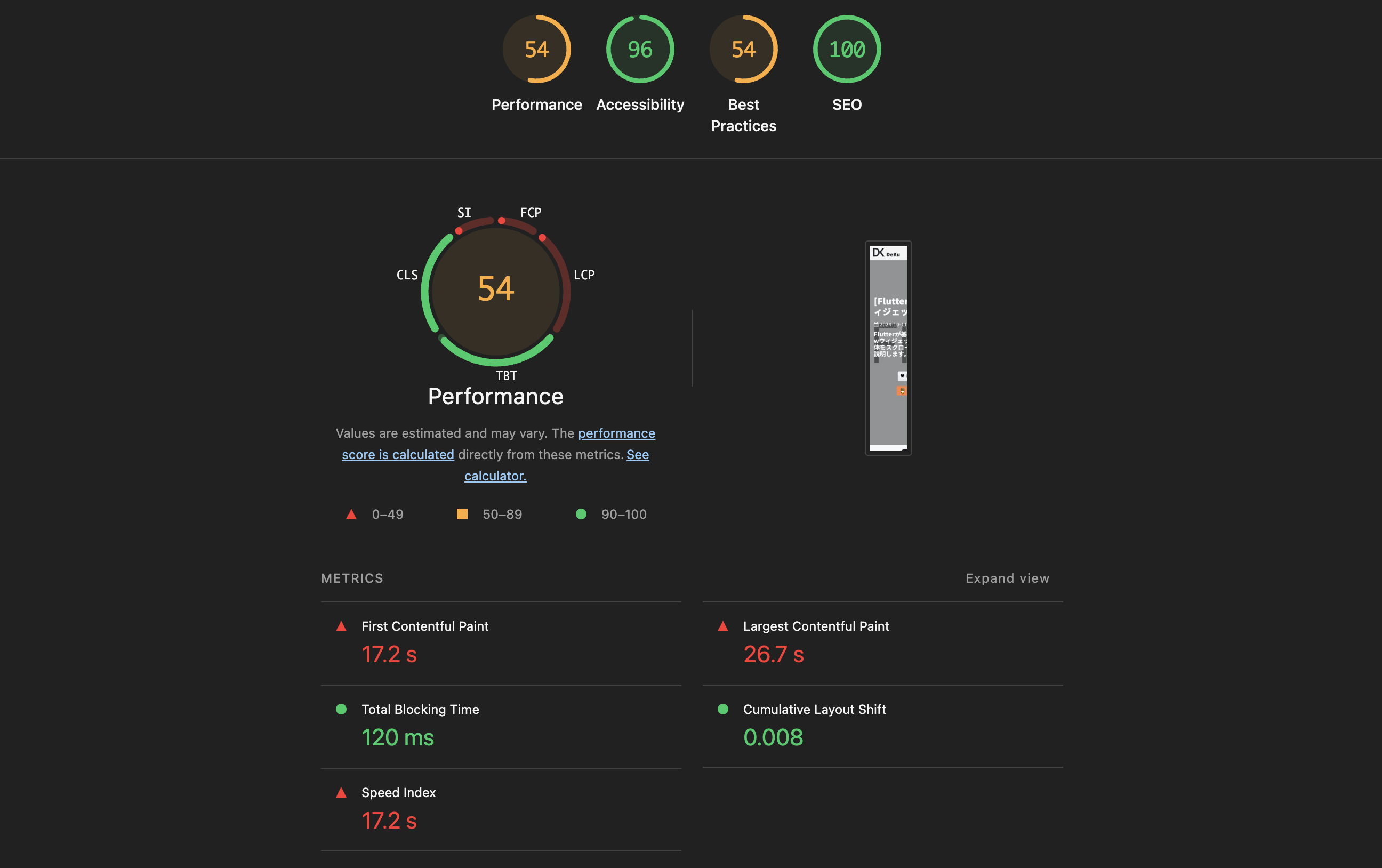
이번 블로그에서는 Astro로 만든 블로그의 Lighthouse 점수를 전반적으로 개선하기 위해 적용한 최적화 작업들을 공유합니다. 이미지 최적화, CSS 최적화, 웹 폰트 최적화, 리소스 힌트, 접근성 개선 등 다양한 영역을 다루고 있으므로, 비슷한 최적화를 계획하시는 분들에게 도움이 되길 바랍니다.
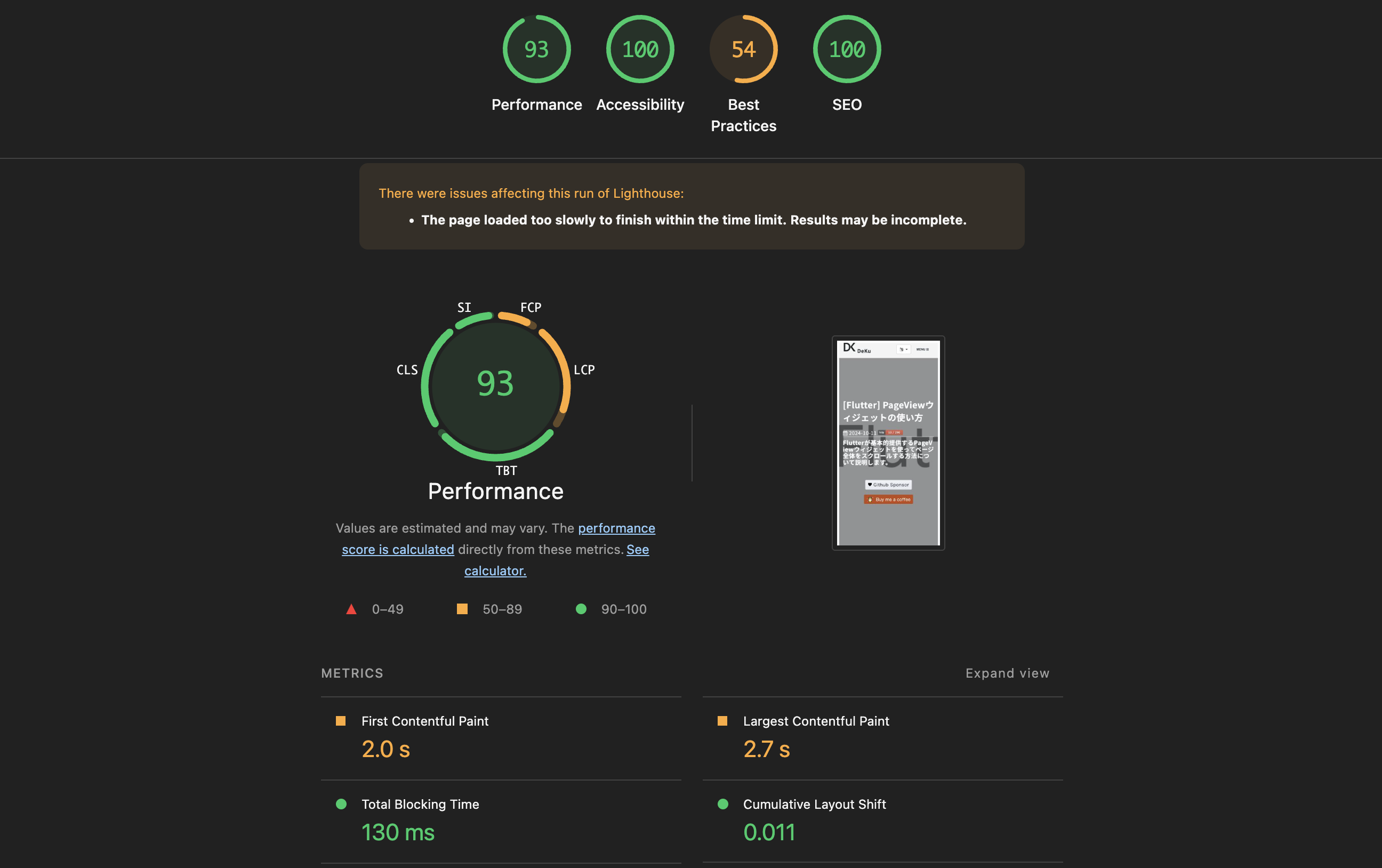
최적화를 적용한 후의 점수입니다. Performance가 93점, Accessibility가 100점으로 크게 향상되었습니다.
이미지 최적화
문제
마크다운에서  문법으로 이미지를 삽입하면, 단순한 <img> 태그만 생성됩니다. 이렇게 하면 다음과 같은 문제가 발생합니다.
AVIF/WebP같은 차세대 포맷을 제공하려면 매번<picture>태그를 수동으로 작성해야 합니다.width/height속성이 누락되어CLS(Cumulative Layout Shift)가 발생합니다.loading="lazy"나decoding="async"같은 최적화 속성도 매번 직접 추가해야 합니다.
해결
이 문제를 해결하기 위해 커스텀 플러그인을 만들어서 사용할 수 있습니다. 여기에서는 rehype 플러그인(rehype-picture)을 만들었습니다. 이 플러그인은 마크다운의 이미지 태그를 자동으로 <picture> 태그로 변환하고, 다음과 같은 작업을 자동으로 수행합니다.
Sharp라이브러리를 사용하여AVIF/WebP포맷의 이미지를 자동 생성- 원본 이미지의
width,height를 읽어 자동 삽입 →CLS방지 loading="lazy",decoding="async"속성 자동 추가
rehype 플러그인을 만들기 위해서 src/plugins/rehype-picture.mjs 파일을 생성하고 다음과 같이 수정합니다.
/**
* Rehype plugin to auto-convert <img> elements and raw <img> HTML strings
* into <picture> elements with AVIF/WebP sources.
*
* Handles both HAST element nodes (from markdown ) and
* raw string nodes (hand-written <img> tags that haven't been parsed by rehypeRaw yet).
*/
import { existsSync } from 'node:fs';
import { join, extname, dirname, basename } from 'node:path';
import sharp from 'sharp';
// Module-level caches — persist across all files in a single build
const dimensionCache = new Map();
const generationCache = new Set();
async function getDimensions(filePath) {
if (dimensionCache.has(filePath)) return dimensionCache.get(filePath);
try {
const meta = await sharp(filePath).metadata();
const dims = { width: meta.width, height: meta.height };
dimensionCache.set(filePath, dims);
return dims;
} catch {
return null;
}
}
async function ensureVariant(srcPath, destPath, format, isAnimated) {
const key = destPath;
if (generationCache.has(key)) return;
generationCache.add(key);
if (existsSync(destPath)) return;
try {
let pipeline = sharp(srcPath, { animated: isAnimated });
if (format === 'avif') {
pipeline = pipeline.avif({ quality: 50 });
} else if (format === 'webp') {
pipeline = pipeline.webp({ quality: 80 });
}
await pipeline.toFile(destPath);
} catch {
// Silently skip if conversion fails (e.g. corrupt image)
}
}
function variantPath(filePath, newExt) {
const dir = dirname(filePath);
const base = basename(filePath, extname(filePath));
return join(dir, `${base}.${newExt}`);
}
function variantSrc(src, newExt) {
const dot = src.lastIndexOf('.');
return `${src.substring(0, dot)}.${newExt}`;
}
function shouldSkip(src) {
if (!src) return true;
if (src.startsWith('http://') || src.startsWith('https://')) return true;
if (src.startsWith('data:')) return true;
if (src.toLowerCase().endsWith('.svg')) return true;
return false;
}
/**
* Determine which variants to generate based on original extension.
* Returns array of { ext, format, mime, animated }
*/
function getVariants(ext) {
const lower = ext.toLowerCase();
switch (lower) {
case '.jpg':
case '.jpeg':
case '.png':
return [
{ ext: 'avif', format: 'avif', mime: 'image/avif', animated: false },
{ ext: 'webp', format: 'webp', mime: 'image/webp', animated: false },
];
case '.gif':
return [
{ ext: 'webp', format: 'webp', mime: 'image/webp', animated: true },
];
case '.avif':
return [
{ ext: 'webp', format: 'webp', mime: 'image/webp', animated: false },
];
case '.webp':
return [
{ ext: 'avif', format: 'avif', mime: 'image/avif', animated: false },
];
default:
return [];
}
}
async function processImage(src, publicDir) {
if (shouldSkip(src)) return null;
const ext = extname(src);
const variants = getVariants(ext);
if (variants.length === 0) return null;
const filePath = join(publicDir, src);
if (!existsSync(filePath)) return null;
const dims = await getDimensions(filePath);
// Generate missing variants
await Promise.all(
variants.map((v) => {
const dest = variantPath(filePath, v.ext);
return ensureVariant(filePath, dest, v.format, v.animated);
})
);
return {
variants: variants.map((v) => ({
srcset: variantSrc(src, v.ext),
type: v.mime,
})),
width: dims?.width,
height: dims?.height,
};
}
function createPictureNode(imgNode, result) {
const sources = result.variants.map((v) => ({
type: 'element',
tagName: 'source',
properties: { srcSet: v.srcset, type: v.type },
children: [],
}));
// Enhance the img node with dimensions and loading attrs
const imgProps = { ...imgNode.properties };
if (result.width) imgProps.width = result.width;
if (result.height) imgProps.height = result.height;
if (!imgProps.loading) imgProps.loading = 'lazy';
if (!imgProps.decoding) imgProps.decoding = 'async';
const enhancedImg = { ...imgNode, properties: imgProps };
return {
type: 'element',
tagName: 'picture',
properties: {},
children: [...sources, enhancedImg],
};
}
function createPictureHtml(src, alt, result) {
const sourceHtml = result.variants
.map((v) => `<source srcset="${v.srcset}" type="${v.type}" />`)
.join('\n ');
const widthAttr = result.width ? ` width="${result.width}"` : '';
const heightAttr = result.height ? ` height="${result.height}"` : '';
const altAttr = alt ? ` alt="${alt}"` : '';
return `<picture>
${sourceHtml}
<img src="${src}"${altAttr}${widthAttr}${heightAttr} loading="lazy" decoding="async">
</picture>`;
}
// Regex to match <img ... > tags in raw HTML strings
const IMG_TAG_RE = /<img\s+([^>]*?)\/?\s*>/gi;
const SRC_ATTR_RE = /src=["']([^"']+)["']/i;
const ALT_ATTR_RE = /alt=["']([^"']*?)["']/i;
function isInsidePicture(raw) {
return /<picture[\s>]/i.test(raw);
}
function walkTree(node, parent, promises, publicDir) {
if (!node) return;
// Case 1: HAST element node — <img> from markdown
if (node.type === 'element' && node.tagName === 'img') {
// Skip if already inside a <picture>
if (parent?.type === 'element' && parent.tagName === 'picture') return;
const src = node.properties?.src;
if (shouldSkip(src)) return;
const idx = parent?.children?.indexOf(node);
if (idx == null || idx < 0) return;
promises.push(
processImage(src, publicDir).then((result) => {
if (!result) return;
parent.children[idx] = createPictureNode(node, result);
})
);
return;
}
// Case 2: raw string node containing <img> tags
if (node.type === 'raw' && typeof node.value === 'string') {
if (!IMG_TAG_RE.test(node.value)) return;
IMG_TAG_RE.lastIndex = 0; // reset after test
// Skip if the raw chunk is inside a <picture>
if (isInsidePicture(node.value)) return;
const idx = parent?.children?.indexOf(node);
if (idx == null || idx < 0) return;
// Collect all <img> tags in this raw node
const imgMatches = [...node.value.matchAll(IMG_TAG_RE)];
if (imgMatches.length === 0) return;
promises.push(
(async () => {
let newValue = node.value;
for (const match of imgMatches) {
const fullTag = match[0];
const srcMatch = fullTag.match(SRC_ATTR_RE);
if (!srcMatch) continue;
const src = srcMatch[1];
const altMatch = fullTag.match(ALT_ATTR_RE);
const alt = altMatch ? altMatch[1] : '';
const result = await processImage(src, publicDir);
if (!result) continue;
const pictureHtml = createPictureHtml(src, alt, result);
newValue = newValue.replace(fullTag, pictureHtml);
}
node.value = newValue;
})()
);
return;
}
// Recurse into children
if (node.children) {
for (const child of node.children) {
walkTree(child, node, promises, publicDir);
}
}
}
export default function rehypePicture(options = {}) {
const publicDir = options.publicDir || 'public';
return async (tree) => {
const promises = [];
walkTree(tree, null, promises, publicDir);
await Promise.all(promises);
};
}그리고 astro.config.mjs 파일을 열고 다음과 같이 플러그인을 설정합니다.
// astro.config.mjs
import rehypePicture from './src/plugins/rehype-picture.mjs';

export default defineConfig({
  markdown: {
    rehypePlugins: [
      [
        rehypePicture,
        { publicDir: new URL('./public', import.meta.url).pathname },
      ],
    ],
  },
});
결과
마크다운에서 아래와 같이 이미지 한 줄만 작성하면,
다음과 같이 최적화된 <picture> 태그가 자동으로 생성됩니다.
<picture>
  <source srcset="/assets/images/example.avif" type="image/avif" />
  <source srcset="/assets/images/example.webp" type="image/webp" />
  <img
    src="/assets/images/example.png"
    alt="예시 이미지"
    width="1200"
    height="630"
    loading="lazy"
    decoding="async"
  />
</picture>
CSS 최적화
Bootstrap 경량화
현재 보고 계신 블로그는 Bootstrap을 사용하고 있습니다. CSS를 경량화하기 위해, 전체 bootstrap.min.css(약 190KB) 대신 그리드 시스템만 포함된 bootstrap-grid.min.css(약 40KB)로 교체했습니다. 실제로 사용하고 있던 유틸리티 클래스(.d-flex, .d-none, .text-center 등)는 global.scss에 직접 정의했습니다.
// global.scss — Bootstrap 유틸리티 대체
.d-flex {
  display: flex !important;
}
.d-none {
  display: none !important;
}
.d-block {
  display: block !important;
}
.justify-content-between {
  justify-content: space-between !important;
}
.justify-content-center {
  justify-content: center !important;
}
.w-100 {
  width: 100% !important;
}
.mx-auto {
  margin-left: auto !important;
  margin-right: auto !important;
}
.text-center {
  text-align: center !important;
}
Astro 인라인 스타일시트
Astro의 빌드 설정에서 inlineStylesheets: 'always'를 적용하여, 외부 CSS 파일 요청 없이 <style> 태그로 인라인 처리되도록 했습니다. 이렇게 하면 CSS 파일을 위한 네트워크 요청이 줄어들어 렌더 블로킹이 감소합니다.
// astro.config.mjs
export default defineConfig({
  build: {
    inlineStylesheets: 'always',
  },
});
CSS 비동기 로딩
Font Awesome의 CSS처럼 초기 렌더링에 필수적이지 않은 스타일시트는 비동기로 로딩하여 성능을 향상시킬 수 있습니다. media="print" 속성과 onload 이벤트를 활용하여, 렌더링을 차단하지 않으면서 CSS를 로딩하도록 수정하였습니다.
<!-- Font Awesome CSS (비동기) -->
<link
  rel="preload"
  as="style"
  href="/assets/vendor/font-awesome/css/font-awesome.min.css"
/>
<link
  rel="stylesheet"
  href="/assets/vendor/font-awesome/css/font-awesome.min.css"
  media="print"
  onload="this.media='all'"
/>
<noscript>
  <link
    rel="stylesheet"
    href="/assets/vendor/font-awesome/css/font-awesome.min.css"
  />
</noscript>
이렇게 수정하면 media="print" 설정에 의해 초기 렌더링에서 제외되고, 로드가 완료되면 this.media='all'로 변경하여 해당 CSS를 적용시킬 수 있습니다.
여기서 <noscript> 태그는 JavaScript가 비활성화된 환경을 위한 폴백 설정입니다.
웹 폰트 최적화
폰트 가중치 축소
폰트를 로드할 때, 사용하지 않는 가중치를 포함하면 불필요한 폰트 파일을 다운로드하게 됩니다. 처음에는 6개 가중치(100, 300, 400, 500, 700, 900)를 모두 로드했는데, 실제로 사용하는 2개(400, 700)로 축소했습니다..
// 변경 전
Noto+Sans+KR:wght@100;300;400;500;700;900

// 변경 후
Noto+Sans+KR:wght@400;700
비동기 로딩
웹 폰트도 CSS 비동기 로딩과 동일한 패턴을 적용합니다. preload로 미리 가져오고, media="print" + onload 패턴으로 렌더 블로킹을 방지했습니다.
<!-- Google Fonts (비동기) -->
<link rel="preconnect" href="https://fonts.googleapis.com" />
<link rel="preconnect" href="https://fonts.gstatic.com" crossorigin />
<link
  rel="preload"
  as="style"
  href="https://fonts.googleapis.com/css2?family=Noto+Sans+KR:wght@400;700&display=swap"
/>
<link
  href="https://fonts.googleapis.com/css2?family=Noto+Sans+KR:wght@400;700&display=swap"
  rel="stylesheet"
  media="print"
  onload="this.media='all'"
/>
<noscript>
  <link
    rel="stylesheet"
    href="https://fonts.googleapis.com/css2?family=Noto+Sans+KR:wght@400;700&display=swap"
  />
</noscript>
Preconnect
Google Fonts는 fonts.googleapis.com과 fonts.gstatic.com 두 개의 도메인을 사용하고 있습니다. preconnect를 설정하여 DNS 조회, TCP 연결, TLS 핸드셰이크를 미리 수행하도록 합니다.
<link rel="preconnect" href="https://fonts.googleapis.com" />
<link rel="preconnect" href="https://fonts.gstatic.com" crossorigin />
또 fonts.gstatic.com에는 crossorigin 속성을 추가했습니다. 이는 폰트 파일이 CORS 요청으로 가져와지기 때문에, preconnect에서도 동일하게 CORS 연결을 미리 설정하기 위해서 입니다.
리소스 힌트 최적화
Preconnect 추가
외부 서비스 도메인에 대해 preconnect를 추가하여 초기 연결 시간을 단축했습니다.
<link rel="preconnect" href="https://www.googletagmanager.com" />
<link rel="preconnect" href="https://pagead2.googlesyndication.com" />
<link rel="preconnect" href="https://utteranc.es" />
LCP 이미지 프리로드
LCP(Largest Contentful Paint) 주요 문제인 히어로 이미지를 <link rel="preload">로 미리 로드하도록 수정했습니다. 또 fetchpriority="high"를 함께 설정하여 브라우저가 해당 리소스를 최우선으로 가져오도록 했습니다.
<link
  rel="preload"
  as="image"
  href="/assets/images/category/web/background.jpg"
  fetchpriority="high"
/>
불필요한 preload 제거
Google Analytics와 Google AdSense 스크립트에 대한 preload를 추가했었지만, 해당 <script> 태그에 이미 async 속성이 있어 브라우저가 자동으로 리소스를 가져오고 있었습니다.
이렇게 async 속성이 붙어있는 경우에는, preload 불필요하고, 오히려 브라우저에 경고가 발생함으로 이를 제거했습니다.
접근성(Accessibility) 개선
코드 블록 주석 색상 대비
코드 블록의 주석 색상이 배경과의 대비가 부족하여 WCAG AA 기준(4.5:1)을 충족하지 못하고 있었습니다. 그래서 주석 색상을 #545454에서 #888888로 변경하여 접근성 기준을 충족시켰습니다.
Footer 텍스트 색상 대비
Footer의 text-muted 색상의 대비도 부족했습니다. 그래서 색상을 #adb5bd로 변경하여 가독성을 개선했습니다.
버튼 색상 대비
블로그 하단에 표시되는 후원 버튼의 색상도 #ff813f가 흰색 텍스트와의 대비 비율이 부족했습니다. 그래서 #e56b2c로 변경하여 WCAG AA 기준을 충족시켰습니다.
이미지 치수 명시
마크다운에 포함되어 있지 않은 이미지(히트 카운터, 제휴 배너 등)에 width와 height 속성을 명시하여 CLS를 방지했습니다. 브라우저가 이미지를 로드하기 전에 공간을 미리 확보하게 만들어서 레이아웃 변동이 발생하지 않도록 했습니다.
완료
이번 최적화에서 적용한 항목들을 정리하면 다음과 같습니다.
| 영역 | 적용 내용 |
|---|---|
| 이미지 | rehype-picture 커스텀 플러그인을 제작하여 <picture> 태그 자동 변환, AVIF/WebP 자동 생성 |
| CSS | Bootstrap 경량화, 인라인 스타일시트, 비동기 로딩 |
| 웹 폰트 | 가중치 축소(6→2개), 비동기 로딩, Preconnect |
| 리소스 힌트 | Preconnect 추가, LCP 이미지 프리로드, 불필요한 preload 제거 |
| 접근성 | 색상 대비 개선, 이미지 치수 명시 |
이것으로 Astro 블로그의 Lighthouse 점수를 개선하기 위해 적용한 최적화 작업들을 정리해 보았습니다. 각 항목을 하나씩 적용하면서 점수 변화를 확인하는 것을 권장합니다. 다음의 관련 포스트도 참고하시기 바랍니다.
제 블로그가 도움이 되셨나요? 하단의 댓글을 달아주시면 저에게 큰 힘이 됩니다!
앱 홍보
Deku가 개발한 앱을 한번 사용해보세요.Deku가 개발한 앱은 Flutter로 개발되었습니다.관심있으신 분들은 앱을 다운로드하여 사용해 주시면 정말 감사하겠습니다.